Risk Calculation
Rhizome's Risk program evaluates a subject (customer or entity) across multiple dimensions to produce an overall risk rating of Low, Medium, or High.
Risk Tiers
Each dimension is assigned a risk level (Low, Medium, High), which maps to a numeric value configured in the Customer Risk Calculation Weights or Entity Risk Calculation Weights step. The default values are:
- Low — 1.0
- Medium — 2.0
- High — 3.0
These values are configurable per account.
Dimensions Evaluated
Each dimension produces a score that is multiplied by a configurable weight. The dimensions are:
Jurisdiction
Derived from the CDD Address Verification step's risk rating. You can configure Monitoring Rule steps with names containing "Jurisdiction" and 2-letter country codes as option values. When a subject's nationality or address country matches one of those codes, the jurisdiction score can be raised to Medium or High.
Industry & Source of Funds
Based on the Source of Funds (customer) or Entity Source of Funds step's risk rating.
PEP
Customers: Based on the PEP Search step's risk rating.
Entities: Computed as the mean PEP score across all UBOs' most recent Risk Assessment records. If a UBO has no assessment, a default High risk score is assigned. If any UBO has not completed due diligence, the overall risk is automatically set to High.
Sanctions
Based on the Sanctions Search step. If the result is "No match", the score is Low. If no sanctions check was completed, the score defaults to very High risk, and a report should be filed with regulators.
Adverse Media
Based on the Adverse Media step's risk rating.
Account Tenure/Maturity
Customers: If a Account Tenure step with a risk rating exists, that rating is used. Otherwise, maturity is calculated from the customer's age:
- High — Age exceeds the Age High Threshold (default: not set). This can be useful in for customers that are focused on VASPs, Gaming, etc. to detect heightened scam or exploitation risk.
- Medium — Age is below the Age Low Threshold (default: 25 years).
- Low — Otherwise.
Additionally, if the relationship duration (time since the primary record was created) is below the Relationship Duration Threshold (default: 18 months), the score can be configured to be raised to Medium or High.
Entities: If a CDD Entity Maturity step exists, its rating is used. Otherwise, maturity is based on the organization's incorporation date:
- High — Less than Age High Threshold year(s) since formation (default: 1).
- Medium — Less than Age Medium Threshold years since formation (default: 2).
- Low — Well-established (beyond the medium threshold).
The same relationship duration check (default 18 months) applies to entities.
Products
Based on the selected Product Offering records. The average risk rating across all selected products is used. Products can be assigned a Low, Medium, or High risk by default.
It's also possible to set an override score on Product Offerings if you have a product that falls outside the typical Low, Medium, and High ratings.
Registration Verification
Based on the Registration Verification step's risk rating.
This step is intended to demonstrate for audit purposes, that someone checked applicable corporate registries to determine if a company is in good standing.
Relationships
Customers: If an Entity Relationships step with a risk rating exists, it is used. Otherwise, complexity is determined by the number of personal relationships:
- Low — Fewer than 2 personal or business relationships.
- Medium — 2–3 personal or business relationships.
- High — 4+ personal or business relationships.
As an example, a person is considered higher risk if they are a Director or Beneficial owner of multiple companies.
Entities: Similar logic based on business relationships.
Alert History
Counts Triage Alert Workflow and threshold report steps within a configurable lookback window (Alert Time Window Days):
- High — 3+ filed threshold reports.
- Medium — 1–2 filed threshold reports, or any valid/escalated triage alerts.
- Low — No alerts or reports.
Suspicious Report History
Counts suspicious reports within lookback windows:
- High — Any suspicious report in the Suspicious Report Time Window.
- Medium — Reports in the Suspicious Report Medium Window but outside the high window.
- Low — No suspicious reports.
Transaction History
Evaluated only when the Transaction History weight and at least one threshold are configured:
- High — Transaction count is below the Transaction History High Threshold.
- Medium — Transaction count is below the Transaction History Medium Threshold.
- Low — Otherwise.
External Factors
Evaluated against External Factor Rule configurations, which define a label, score, minimum count, and lookback window. The highest triggered score becomes the dimension value. Rules marked as "Override" can force the overall risk to at least that level (see below).
Score Aggregation
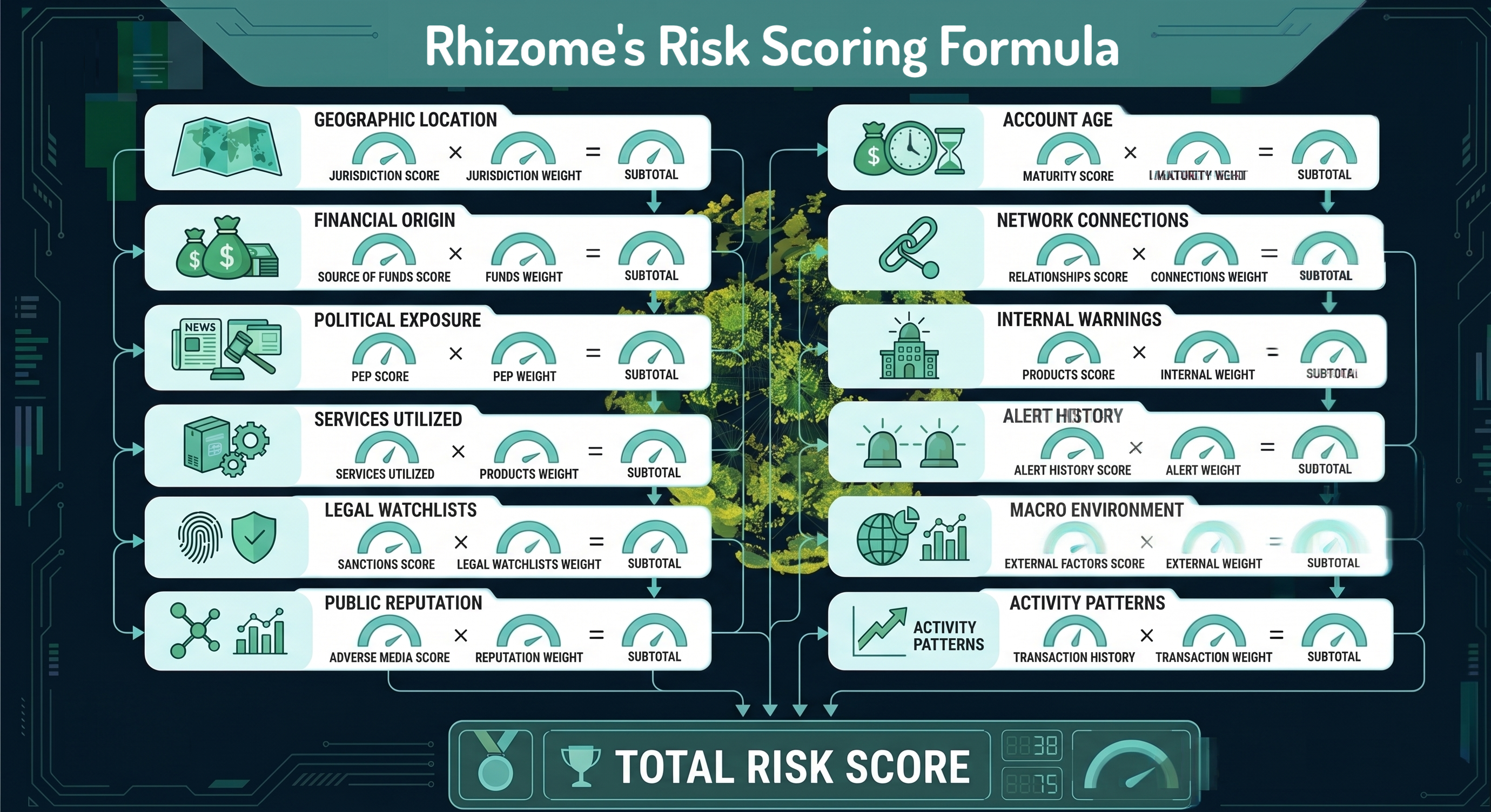
The total risk score is a weighted sum of each dimension's numeric value multiplied by its configured weight:
total = jurisdiction * weight_jurisdiction + industry_source_of_funds *
    weight_industry_source_of_funds + pep * weight_pep + sanctions *
    weight_sanctions + adverse_media * weight_adverse_media + products *
    weight_products + registration_verification *
    weight_registration_verification + maturity * weight_maturity +
    relationships * weight_relationships + alert_history * weight_alert_history
    + suspicious_report_history * weight_suspicious_report_history +
    external_factors * weight_external_factors + transaction_history *
    weight_transaction_history
The overall risk category is determined by comparing the difference between the total weighted sum and the number of dimensions against the Low/Medium/High threshold values. The closest threshold wins.
Override Floors
Certain dimensions can be designated as Override Floors in the weights configuration. When a floor dimension's "Override" option is enabled, the overall risk cannot fall below that dimension's rating. If multiple floor dimensions are triggered, the highest rating among them becomes the minimum.
See the Risk Overrides page for details on configuring override floors, external factor overrides, and other override types.
External Factor Overrides
External Factor Rules with the "Override" flag can elevate the overall risk to at least the rule's score when triggered. This is separate from dimension-based override floors.
KYC State Escalation
Customers:
If the KYC state is
rejected
or
auto-rejected, the overall risk is automatically set to
High
(from there you should either Accept the auto-rejected KYC as a
false-negative, or file a report).
Entities:
If the entity's state is
rejected, the overall risk is automatically set to
High.
Monitoring Rule Overrides
When risk is recalculated for any reason (events like new alerts, reports filed, and so on), any active monitoring rule overrides (with a future Override Expires At) are preserved. Overrides set the overall risk to a specified level and persist across recalculations until they expire.
See the Risk Overrides page for details on configuring monitoring rule overrides (On Trigger vs On Validate), manual overrides, initial risk imports, and clearing overrides.
Customer vs Entity Differences
While the overall structure is similar, there are key differences:
- PEP: Customers use their own PEP Search result; entities use the mean of all UBO assessments.
- Account Tenure/Maturity: Customers use age/birthdate as a proxy for likely financial history; entities use incorporation date.
- Industry/SOF: Separate source-of-funds steps for customers vs entities.
- Auto-High: Entities get auto-High if any UBO has not completed due diligence.
Configuration
Risk calculation weights are configured via the Customer Risk Calculation Weights and Entity Risk Calculation Weights blueprints. Each dimension has a weight field and optionally an "Override" floor checkbox. Additional parameters include age thresholds, relationship duration thresholds, transaction history thresholds, and time windows for alerts and suspicious reports.